Shipping an indie Mac app: signing and notarization
What Gatekeeper checks, why signing order matters, and the release pipeline that now ships NotchStar.
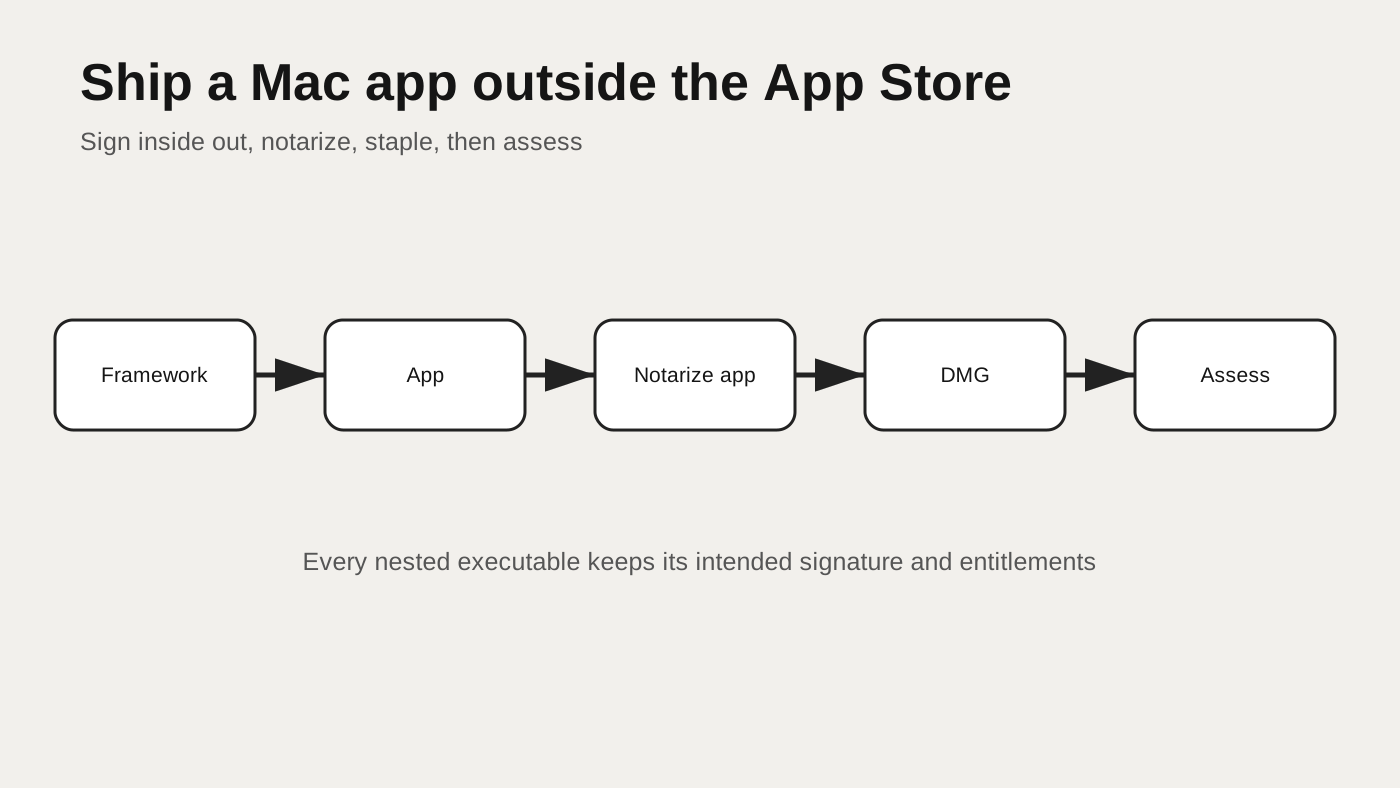
TL;DR
- A Mac app distributed outside the App Store should be signed with a Developer ID Application certificate, use the hardened runtime, and be submitted to Apple’s notarization service.
- Sign nested code first and the app last with its entitlements. Do not use
codesign --deepas a signing strategy. - Notarize and staple the app, then create, sign, notarize and staple the DMG. Verify the finished artifacts with
codesign,staplerandspctl. - NotchStar has used this verified path since version 1.0.3. The current release evidence in this repository is version 1.0.5.
Contents
- What the user sees
- What Gatekeeper checks
- Accounts, certificates and credentials
- A dedicated signing keychain
- Sign from the inside out
- The entitlements failure
- Notarize the app and DMG
- Verify the result
- Troubleshooting
- Try it yourself
- Cheat sheet
What the user sees
An unsigned or incorrectly prepared app can produce a warning that it cannot be opened, that Apple cannot check it for malicious software, or that the developer cannot be verified. The exact wording depends on the macOS release, the artifact, quarantine state and what Apple can establish about it.
That warning is not a generic review of application quality. It is the visible result of a chain of security checks. A developer can make the chain understandable by treating signing, notarization, packaging and final assessment as separate steps.
Apple’s Developer ID overview describes distribution outside the Mac App Store and the role of Developer ID certificates and notarization. Apple’s notarization documentation is the primary reference for the submission workflow. The release script should follow those contracts rather than copy a command with unexplained flags.
What Gatekeeper checks
When an app arrives through a download, macOS can attach quarantine metadata. Opening it gives Gatekeeper a chance to evaluate its origin and integrity. A Developer ID signature connects the code to an Apple issued distribution identity. The hardened runtime enables the runtime protections expected by the notarization path. Notarization records Apple’s automated scan result, and a stapled ticket lets that result travel with the artifact.
These are related but not interchangeable:
| Layer | Question it answers | Typical tool |
|---|---|---|
| Code signature | Has this code changed since the developer signed it | codesign --verify |
| Developer ID | Is the signing identity issued for outside store distribution | codesign -dv |
| Hardened runtime | Was the app signed with the runtime option | signature flags |
| Notarization | Did Apple’s service accept the submitted artifact | notarytool |
| Stapling | Is a ticket attached to the distributed artifact | stapler validate |
| Gatekeeper policy | Would macOS accept this app or disk image in context | spctl --assess |
A successful local signature does not prove notarization. An accepted notarization submission does not prove the final DMG contains the exact app you assessed earlier. Verification belongs at the end, against the same files sent to users.
Stapling matters for machines that cannot immediately contact Apple. It is also a useful release assertion: if stapling cannot find an accepted ticket for the submitted bytes, the pipeline should stop.
Identity, integrity and policy are different answers
The certificate identifies the developer account that produced the signature. The cryptographic seal detects changes to signed code and resources. Gatekeeper then applies platform policy to the quarantined artifact. These answers are easy to collapse into the sentence “the app is signed,” but debugging becomes much clearer when they remain separate.
A valid ad hoc signature can provide integrity for local development without identifying a Developer ID publisher. A Developer ID signature can be structurally valid while its notarization submission is rejected. An accepted app can later be placed in a different or unsigned container. Each transition needs its own check.
The same separation helps with user support. If codesign fails, inspect bundle mutation and nested code. If stapler fails, inspect accepted submissions and exact artifact bytes. If spctl fails, inspect the policy context and distribution form. Guessing at certificates before knowing which layer failed wastes time and can create a second fault.
Accounts, certificates and credentials
The process begins with an Apple Developer Program membership and a Developer ID Application certificate. The certificate’s private key must be available to codesign. Notarization also needs authenticated access to App Store Connect or another Apple supported credential form.
NotchStar stores neither signing secrets nor private identifiers in the repository. Local setup imports the required identity into a dedicated keychain and saves a named notarytool credential profile. The release script refers to that profile, not to raw credentials on its command line.
That separation gives the repository a useful property: another developer can read the whole release procedure without learning a team identifier, key identifier, issuer identifier, password or private key. Logs can show submission status and public signature properties while still withholding setup material.
The setup script and release script should have different responsibilities. Setup may create a keychain, import an identity and store a notary profile. Release should assume those named resources exist, confirm the identity can be found, and stop with a useful message if they do not. Repeating imports during every release adds more secret handling to the most frequently run path.
Environment variables should point to local resource names, not contain exported private keys. Quote every path because certificate files, archives and app names often contain spaces. Before printing diagnostic environment state, use an allowlist. A broad env dump during a failed signing job can expose more than the signing credential.
- Developer ID Application identity available locally
- Private key held outside the repository
- Notary credentials stored under a local profile name
- Entitlements file reviewed in source
- Release script prints no secrets
- CI or another machine needs its own secure setup
The certificate and key answer who can sign. The notary credential answers who can submit. They should be rotated and revoked independently when necessary.
A keychain that signs without prompts
Automated release scripts cannot pause behind a keychain dialog. A dedicated keychain narrows the identities available to the job and lets setup grant codesign access to the imported key.
The important step is not merely importing a certificate. The private key access control must allow Apple’s signing tool. A common setup uses security set-key-partition-list after import. The exact password and keychain path remain local inputs.
security create-keychain -p "$KEYCHAIN_PASSWORD" "$SIGNING_KEYCHAIN"
security import "$CERTIFICATE_FILE" \
  -k "$SIGNING_KEYCHAIN" -P "$CERTIFICATE_PASSWORD" \
  -T /usr/bin/codesign
security set-key-partition-list -S apple-tool:,apple: \
  -s -k "$KEYCHAIN_PASSWORD" "$SIGNING_KEYCHAIN"
Use task specific variable names in real scripts and avoid printing them. Unlock the keychain only for the release job. A restart can lock it again, which is preferable to leaving a developer machine with a permanently unlocked signing identity.
Sign from the inside out
An app bundle can contain frameworks, helpers and other executable code. Each nested code object needs its own valid signature. Sign the deepest items first, then sign the containing app last. The outer signature then seals the already signed contents.
NotchStar bundles MediaRemoteAdapter.framework. Its production path signs that framework with the hardened runtime and timestamp, then signs the app with the same runtime requirements plus the app entitlements.
codesign --force --options runtime --timestamp \
  --sign "$DEVELOPER_ID" \
  "$APP/Contents/Frameworks/MediaRemoteAdapter.framework"

codesign --force --options runtime --timestamp \
  --entitlements "$ENTITLEMENTS" \
  --sign "$DEVELOPER_ID" "$APP"
Apple’s hardened runtime documentation explains the runtime capability, while the distribution signing workflow is covered in creating distribution signed code. The flags should follow what the app actually needs, not a broad list copied from another product.
After signing, verify structure and inspect important properties:
codesign --verify --deep --strict "$APP"
codesign -dv "$APP"
codesign -d --entitlements - "$APP"
Using --deep for verification walks nested code. Using --deep to force a signature across the bundle is a different and risky operation. It can replace carefully applied nested signatures or produce an outer app whose entitlements are not what its features require.
The entitlements failure
An earlier NotchStar release path used codesign --force --deep while applying an ad hoc signature. That appeared harmless during local packaging, but it stripped the app’s entitlements. Under the hardened runtime, features such as camera access, calendar access and Apple Events could silently fail even though the bundle still looked signed.
The repair was not an extra command after the fact. It was changing the signing order: sign the nested framework, then sign the app once with its entitlement file. The release script now fails if the signed result does not contain an expected camera entitlement.
codesign -d --entitlements - "$APP" 2>/dev/null \
  | grep -q "device.camera" \
  || { echo "entitlements are missing"; exit 1; }
This assertion turns a past production risk into a release gate. It also shows why codesign --verify alone is insufficient. Verification can say a signature is internally valid without saying it contains the capabilities the app needs.
Notarize the app, then the DMG
The service accepts archive formats rather than a bare app directory, so the script first creates a ZIP that preserves the app bundle. It submits that archive with notarytool and waits for a result. If Apple rejects the submission, the script extracts its submission identifier and requests the detailed log.
ditto -c -k --keepParent "$APP" "$APP_ZIP"
xcrun notarytool submit "$APP_ZIP" \
  --keychain-profile "$NOTARY_PROFILE" --wait
xcrun stapler staple "$APP"
The app is stapled before packaging. Next the release creates the DMG from that app, signs the DMG, submits the DMG, and staples the accepted ticket to the DMG.
codesign --force --sign "$DEVELOPER_ID" --timestamp "$DMG"
xcrun notarytool submit "$DMG" \
  --keychain-profile "$NOTARY_PROFILE" --wait
xcrun stapler staple "$DMG"
Why submit both? The app is the executable users launch, while the DMG is the quarantined container they open first. Preparing and assessing both removes ambiguity from that delivery path. It also catches accidental modification between app submission and disk image creation.
Treat the notary result as structured evidence
notarytool submit --wait ends with an accepted, invalid or failed result. The release must examine that status instead of assuming a zero length pause means success. On failure, the submission identifier is useful because notarytool log returns Apple’s findings for that exact upload.
The log can name an unsigned executable, a missing secure timestamp, a disabled hardened runtime, or another property of a nested component. Preserve the useful messages in release output, but do not attach local credential arguments or key material. A submission identifier is operational metadata; it is not a substitute for the artifact checksum and version in your own release record.
| Result | Pipeline action |
|---|---|
| Accepted | Continue to stapling and validation |
| Invalid | Fetch log, stop, fix the named code object |
| Upload or service failure | Stop and retry deliberately, without rebuilding bytes |
| Unknown output | Stop rather than packaging an unproven artifact |
Rebuilding before a retry changes the bytes and creates a new question. If the failure is transient, resubmit the same archive. If the log identifies a code problem, rebuild once after the source or release process is corrected, then treat that as a new candidate.
NotchStar first shipped this verified Developer ID and notarization path in version 1.0.3 on 9 October 2026. Versions 1.0.0 through 1.0.2 used ad hoc signing. The repository’s current verified release fact is version 1.0.5, dated 12 October 2026. Those dates describe this app’s release history, not a general Apple requirement.
Verify the artifact users receive
The final checks run after stapling:
xcrun stapler validate "$DMG"
spctl --assess --type open \
  --context context:primary-signature -v "$DMG"
spctl --assess --type execute -v "$APP"
The script also checks the app signature before packaging. For a release candidate, copy the DMG to a clean test location, mount it, copy the app as a user would, and open it. Command output is necessary evidence, but the actual first launch remains a separate end to end check.
Do not remove quarantine metadata merely to make a warning disappear during testing. The point is to observe the same policy path a downloaded artifact receives.
Verify after upload too
A local DMG can pass every check and still differ from the file served by a website if deployment chose an older asset or transformed it. After release, download from the public URL to a new path, compute its checksum, and run the DMG assessment against that copy. Mount it and assess the contained app as well.
This final loop distinguishes source complete, locally packaged, uploaded, and live. It also catches stale content delivery caches. NotchStar’s release facts are based on checks against the live DMG, not only the file produced in the release directory.
- Download through the same public URL a customer uses
- Compare size and checksum with the release artifact
- Validate the stapled DMG ticket
- Run the Gatekeeper open assessment
- Mount and assess the contained app
- Perform first launch without removing quarantine
Troubleshooting the real failure modes
| Symptom | Check first | Repair |
|---|---|---|
codesign asks for access or hangs | Key access control and keychain lock | Configure the partition list and unlock for the job |
| Signature verifies but camera fails | Entitlements on the signed app | Sign the outer app last with its entitlements |
| Notarization says invalid | Fetch the submission log | Fix the named binary, signature or runtime issue |
| Stapler cannot find a ticket | Submitted bytes and accepted status | Confirm the exact app or DMG was accepted |
| DMG assessment fails | DMG signature and notarization | Sign, submit and staple the final DMG |
| A nested framework is rejected | Nested signature and timestamp | Sign nested code before the app |
Apple maintains a guide to common notarization issues. Read the service log before changing flags. Repeatedly adding exceptions can hide the actual unsigned or incorrectly signed component.
A wrong turn: one command with deep signing
codesign --deep looks like an attractive shortcut because it walks the bundle. The problem is that a release bundle is not one uniform object. A framework and an app can need different entitlements, and the outer signature must seal the final nested signatures.
The explicit list is longer but reviewable. When a new helper is added, the release script must name and sign it. That small maintenance cost is better than discovering after upload that a broad recursive command changed capabilities.
Try it yourself
Build the workflow as a sequence of assertions rather than one large script:
- Archive a release build and list every nested executable.
- Sign each nested framework or helper with Developer ID and runtime.
- Sign the app last with its intended entitlements.
- Verify the app and inspect its signed entitlements.
- Create a ZIP with
dittoand submit it withnotarytool --wait. - Fetch the notary log on every rejected result.
- Staple and validate the app.
- Build and sign the DMG from that exact app.
- Submit, staple and validate the DMG.
- Run both
spctlassessments and perform a clean first launch.
Start with a disposable test app if your production bundle has many helpers. Keep credentials out of shell history and logs. Apple’s custom notarization workflow is the reference when your packaging differs from a simple app and DMG.
Cheat sheet
| Step | Release gate |
|---|---|
| Nested signing | Every executable has its intended signature |
| App signing | Runtime, timestamp and required entitlements are present |
| App notarization | Accepted result, app ticket stapled |
| DMG packaging | Contains the exact accepted app |
| DMG notarization | Accepted result, DMG ticket stapled |
| Final verification | codesign, stapler, spctl and clean first launch pass |
If you want to inspect the result from a user’s side, download the current NotchStar DMG. The app’s privacy page also explains which permissions its signed entitlements support and when each feature uses them.
NotchStar is a native Mac notch app, $4 once, with a 7 day free trial. Try it, or read the ten tools.