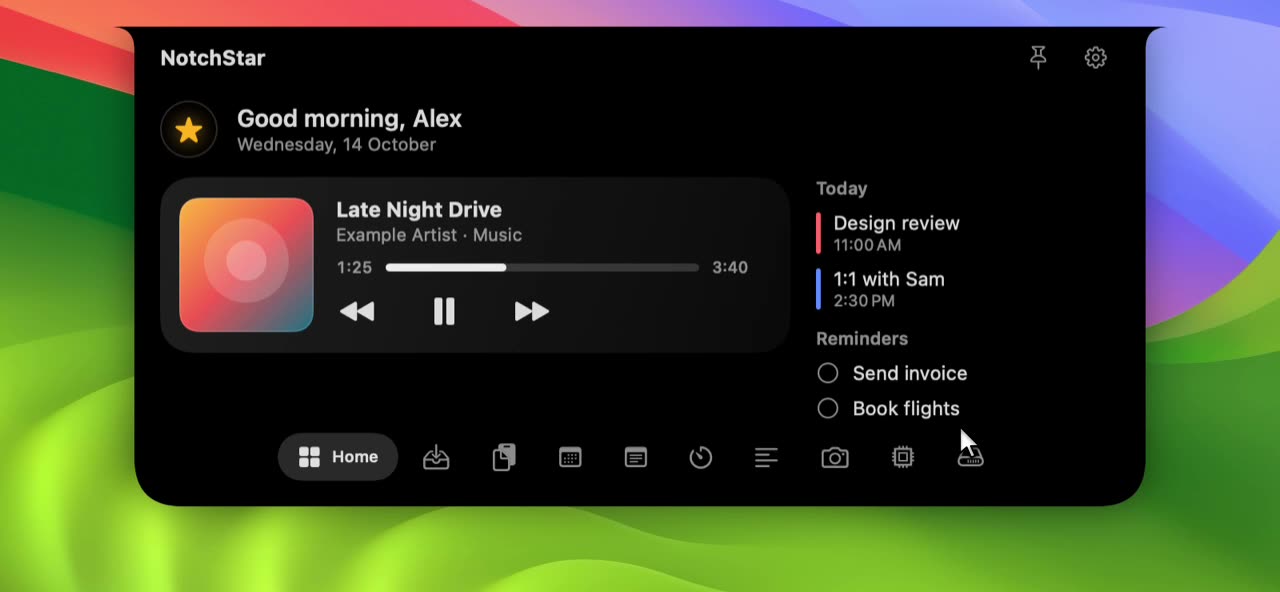
Now playing, with real album art
What is playing, and a button to change it.
What it does.
- Real artwork
- The cover comes from macOS itself, so it matches the track that is actually playing, not a lookup by name.
- Live, not polled
- Play, pause and track changes appear the moment they happen, because NotchStar listens to the system Now Playing service.
- Controls that reach the right app
- Previous, play or pause and next go to whichever app is currently playing.
- Honest progress
- A progress bar and timestamps appear when the player publishes a duration and elapsed time, and never as a guess.
Music apps live in the Dock and the menu bar, but the notch is closer to where you look. The Home tab shows the current track with its cover, a title and artist line, and the three buttons you actually use.
How it stays accurate
NotchStar listens to the same service macOS uses for the Control Center Now Playing tile. That means it sees what the system sees, from any app that reports to it, and updates instantly.
It only listens while the card is on screen. Close the notch and the listener stops.
When there is no progress bar
Some tracks, such as radio style Apple Music items, have no duration, so there is nothing true to draw. NotchStar leaves the bar out. When a duration and elapsed time exist, the bar moves in real time.
Curious how this works under macOS’s restrictions? Read how notch apps read now playing.
- Some players do not publish a duration. Apple Music radio style and some streaming items are examples, and for those you see no progress bar.
- It relies on a macOS interface that Apple does not document and has restricted before. If it stops working after an update, NotchStar falls back to AppleScript for Music and Spotify only.
- Which apps appear depends on whether the app reports to the system's Now Playing.
Questions about Now Playing.
Does it work with Spotify and Apple Music?
Yes. Both report to the system Now Playing, and if that route is unavailable NotchStar can still read both through AppleScript.
Why is there no progress bar for some songs?
Because the player did not provide a duration or elapsed time, and NotchStar will not invent one. A bar appears when the information is real.
How does it read what is playing, given macOS restrictions?
It uses an open source adapter that reads the system Now Playing state through an Apple signed helper. Our guide on how notch apps read now playing explains the tradeoffs in detail.
Pair it with.
- Calendar & Reminders
- What is next, without opening Calendar. See Calendar & Reminders
- Timers
- Focus sessions without another window. See Timers

Put your notch to work.
Download NotchStar, open your first tool in seconds, and decide after 7 days whether it earns $4.