How a notch app reads Now Playing on macOS 15.4 and later
The private framework route changed. Here is the adapter, watchdog and fallback that keep one real Mac app honest.
TL;DR
- macOS has a system Now Playing state, but Apple does not provide a public general purpose API for third party Mac apps to read every player.
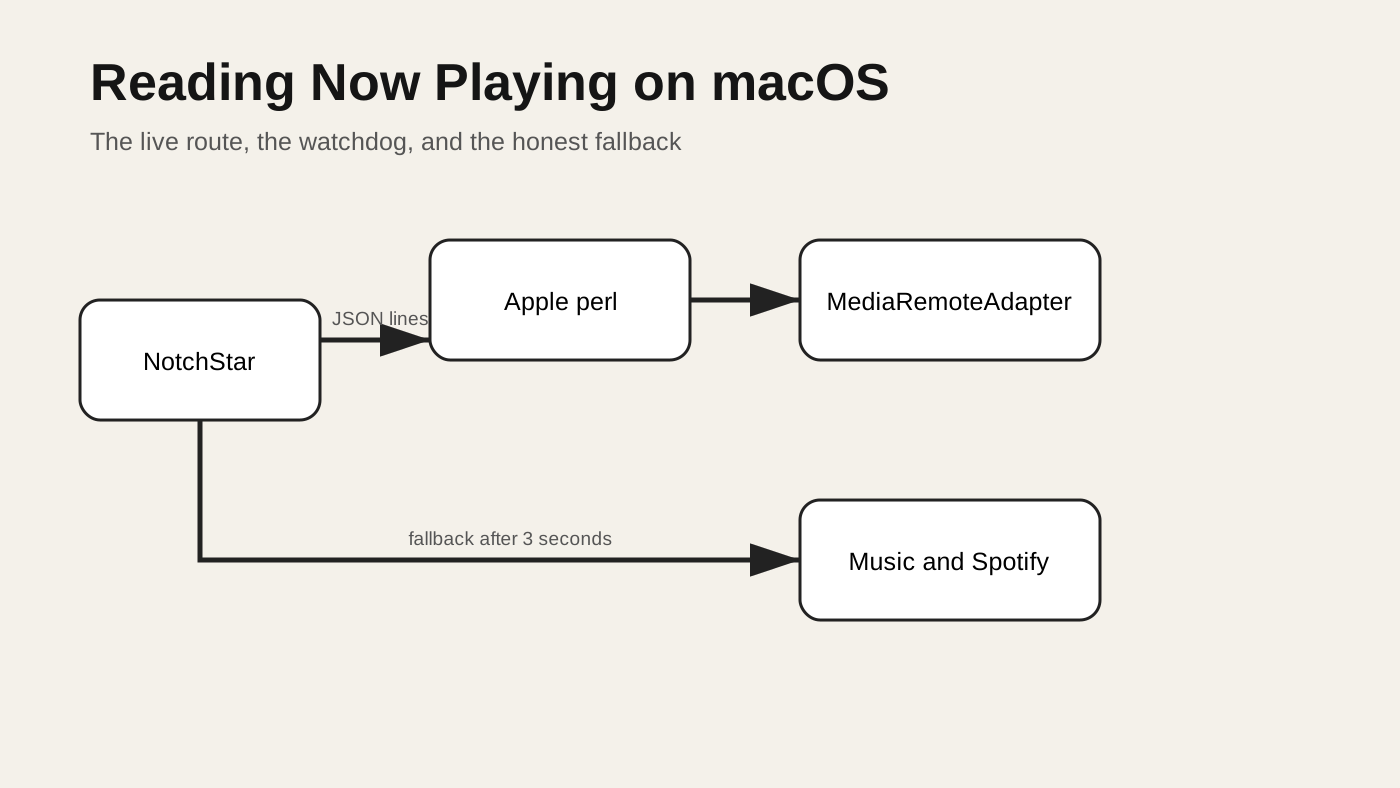
- NotchStar starts the open source MediaRemoteAdapter through Apple’s
/usr/bin/perl, reads one JSON object per line, and stops the helper when the card leaves the screen. - A three second watchdog switches to AppleScript polling for Music and Spotify when the stream is silent or exits.
- This is a private interface. It can break after a macOS update, so the app treats missing artwork, duration and players as normal states instead of inventing data.
Contents
- What Now Playing means on a Mac
- What changed in macOS 15.4
- Four possible routes
- The adapter and JSON stream
- Lifecycle and fallback
- Elapsed time and artwork
- Failure cases and live checks
- A small experiment you can run
- Cheat sheet
What Now Playing means on a Mac
When Music, Spotify, a browser or another player reports media state to macOS, the system can show a title, artist, artwork and transport controls. The keyboard media keys can act on the current player. A user experiences this as one shared state even though the data began in another process.
For an app developer, that shared state is useful. A compact player can follow the active source without integrating with every service. The difficult part is access. Apple documents APIs for an app to publish its own Now Playing information, especially through MPNowPlayingInfoCenter, but that is not the same as a supported API for a separate Mac app to read the system state of every other player.
NotchStar needs the reading side. Its Home card shows the title, artist, artwork, playback state, elapsed time and duration supplied by the current player. It also sends previous, play or pause, and next commands. It does not sign in to a music service and does not scan a library. That narrow boundary matters: the card reflects what macOS reports, and nothing more.
What changed in macOS 15.4
Older Mac utilities often loaded the private MediaRemote framework directly. That route was attractive because it exposed the common system state, including artwork and timing, without an integration for every player.
Starting with macOS 15.4, that direct route stopped working for ordinary third party processes. Apple does not describe MediaRemote as a public API, and the macOS 15.4 release notes do not promise compatibility for it. The dated behavior is documented by the MediaRemoteAdapter project, which was created to restore access after direct loading became nonfunctional.
That distinction is important. The operating system version is observed and reproduced by the adapter project. It is not an Apple guarantee about a supported interface. Code built on it should be written as code that may need repair.
MediaRemoteAdapter, by Jonas van den Berg and contributors, uses an Apple supplied process that has the required access. NotchStar includes the adapter under its BSD 3 clause licence and starts it through /usr/bin/perl. The helper dynamically loads the bundled framework and writes updates to standard output. NotchStar remains the parent process and owns its lifetime.
Four possible routes
There is no single perfect choice. The right route depends on whether the app needs broad player coverage, artwork, timing, or only basic controls.
| Route | Player reach | Artwork and timing | Main cost |
|---|---|---|---|
| AppleScript for named apps | Music and Spotify in this implementation | Limited to what each script asks for | Polling, permission behavior and app specific scripts |
| Direct private framework | Broad when it works | Rich system state | It stopped working for ordinary processes from macOS 15.4 |
| MediaRemoteAdapter | Broad system state | Rich JSON snapshots | Private API risk and a child process to manage |
| Reading visible interface text | Whatever is on screen | Fragile and incomplete | Accessibility permission, localization and changing layouts |
AppleScript is a useful fallback because Music and Spotify expose scriptable properties. It is not a general system reader. A browser tab, podcast client or other player will be absent unless it has its own integration. Polling also means a small delay and repeated work even when nothing changed.
Interface scraping is worse for this use. Text can move, controls can change names, and artwork or precise elapsed time may not be available. It can also require a permission that is out of proportion to a small media card.
The adapter route provides the best result for NotchStar today, but its wider reach does not remove the need to design for absence. A radio stream may omit duration. A player may report stale artwork. A future macOS release may make the helper silent. Every field remains optional.
Starting the adapter
The app locates two bundled resources: the adapter script and its framework. It then starts Apple’s Perl interpreter with the framework path and stream options.
process.executableURL = URL(fileURLWithPath: "/usr/bin/perl")
process.arguments = [
    script.path,
    framework.path,
    "stream",
    "--no-diff",
    "--debounce=100"
]
stream keeps the helper alive. --no-diff requests complete snapshots rather than patches, which makes recovery and parsing simpler. --debounce=100 groups rapid changes so a burst from a player does not force a corresponding burst of interface work.
The process writes JSON lines. A line is a complete event boundary: read bytes, split at a newline, decode one object, then publish it on the main actor. Partial reads must stay buffered because a pipe read is not guaranteed to end at a JSON boundary.
The snapshot model normalizes the adapter keys into fields the interface can use. Title and artist are strings. Duration and elapsed time are numbers when the player supplies them. Artwork arrives as encoded data and is decoded only when present. Playback state becomes a small enum rather than leaking adapter strings through the view layer.
while let line = try await reader.nextLine() {
    guard let data = line.data(using: .utf8),
          let snapshot = NowPlayingSnapshot.parse(data)
    else { continue }

    await MainActor.run {
        self.snapshot = snapshot
        self.receivedAdapterUpdate = true
    }
}
The actual implementation has more cleanup around this loop, but the contract is this small: each valid line replaces the old state. A complete snapshot also avoids a subtle class of bugs where a missing field in the next event accidentally leaves the previous track’s artwork or duration on screen.
Parse at the boundary
The JSON shape belongs to the adapter, not to the interface. Parsing it directly inside a SwiftUI view would spread private framework details through rendering code and make recorded fixtures difficult to use. A boundary type provides a better place to absorb naming changes and reject malformed values.
For example, a duration should be finite and greater than zero before it controls a progress bar. An artwork string can be present but fail base64 decoding. A playback rate may be absent even when a Boolean state is available. Each conversion is local, and a bad optional field should not throw away a good title.
There is also a threading boundary. Pipe reads and JSON decoding do not belong on the main actor. Only the final assignment that changes observable state needs to cross to it. Keeping decoding away from interface work prevents a large artwork payload from delaying a hover animation.
The pipe can close in the middle of a buffered line. That remainder is not a complete event and should be discarded. Trying to decode it as a final snapshot creates a noisy error precisely when the helper is already exiting. Process termination, end of file and task cancellation all converge on the same cleanup path, which then decides whether fallback is appropriate.
Commands travel separately
Reading state and sending transport commands are related but different operations. A snapshot says which player is active and whether it is playing. A command asks the system to toggle playback or move tracks. The interface should not optimistically rewrite the snapshot after a button click because the player may reject the command or choose a different state.
Instead, the button sends the command and the next system update remains authoritative. This can make the control feel a fraction slower, but it avoids showing pause while audio continues. It also handles the active player changing between the click and the response without inventing a local truth.
Lifecycle belongs to the view
A helper that works is still a resource. Leaving it alive after the card closes wastes a process and makes shutdown harder. NotchStar connects listening to the card’s visibility:
.onAppear { model.start() }
.onDisappear { model.stop() }
start() clears an earlier fallback, creates the pipe and process, begins the stream reader, and arms a watchdog. stop() cancels the reader, watchdog and fallback tasks, terminates the process, and clears references. Tests also cover the case where the helper once outlived the main app. Parent ownership is not enough by itself if cancellation and termination race during quit.
The watchdog waits three seconds for a usable adapter update. If none arrives, it terminates the adapter route and begins the smaller AppleScript route. An early process exit takes the same path. Three seconds is long enough to avoid changing routes during a normal launch, but short enough that a user does not stare at an empty card for a session.
watchdog = Task { [weak self] in
    try? await Task.sleep(for: .seconds(3))
    guard !Task.isCancelled,
          self?.receivedAdapterUpdate == false
    else { return }
    await self?.startAppleScriptFallback()
}
The fallback polls once a second. It asks Music and Spotify for their current state and converts the response to the same NowPlayingSnapshot model. The view does not need to know which route produced the snapshot. That shared representation keeps the fallback honest: it cannot pretend to have artwork or timing that its script did not return.
This lifecycle produces four useful properties:
- No listener runs before the card is visible
- One model owns one helper process
- Silence has a deadline
- Both routes produce the same optional fields
- Closing the card cancels polling and terminates the helper
Elapsed time without a fake clock
A player snapshot includes an elapsed value measured at a particular instant. If the track is playing, the interface can advance from that anchor using the current time. If it is paused, the displayed value must stay fixed. In both cases it must remain between zero and the supplied duration.
func elapsed(at now: Date) -> TimeInterval? {
    guard let elapsed else { return nil }
    let value = isPlaying
        ? elapsed + now.timeIntervalSince(timestamp)
        : elapsed
    return duration.map { min(max(0, value), $0) } ?? max(0, value)
}
The card only shows a progress bar when both elapsed time and duration exist. Live radio and some remote streams do not report a meaningful end. Hiding the bar is better than drawing a confident but invented percentage.
Artwork deserves the same restraint. The adapter may supply encoded image data. The snapshot decodes it to an image for the current card and lets the old image go when the snapshot changes. There is no reason for this small view to build a permanent artwork cache or a listening history. Less retained data also matches the product boundary: NotchStar shows the present state and does not build a profile of playback.
What failure looks like
Private integrations fail in several different ways. A useful interface turns each one into a bounded state rather than one generic error.
| Failure | What the user sees | What the app does |
|---|---|---|
| Helper never produces a line | The card waits briefly | Watchdog starts Music and Spotify polling after three seconds |
| Helper exits | The system card stops updating | Process cleanup runs, then the fallback starts |
| Current player has no duration | Title and controls, no progress bar | It does not estimate a duration |
| No supported player is active | No track card | It keeps the surrounding Home view usable |
| A macOS update blocks the route | Other players may disappear | Fallback still covers Music and Spotify while the adapter is repaired |
| Artwork is absent or invalid | Text remains, image is absent | The decoder rejects the image without rejecting the snapshot |
Unit tests cover parsing, conversion from the AppleScript result, elapsed time, and helper cleanup. A live test checks the bundled framework and adapter on a real Mac. That last test matters because a mocked JSON line can prove the parser but cannot prove the operating system still allows the route.
The live test should be treated as a release signal, not a promise that every player behaves identically. Before a release, exercise at least one system player, one third party player, pause and resume, a track with duration, and an item without duration. Then quit while the card is open and confirm no Perl helper remains.
A wrong turn: treating silence as empty media
The easiest implementation is to start the helper, read the pipe, and show an empty state until a line arrives. That confuses transport failure with a valid state. A silent helper and a stopped player look identical, so the app cannot recover.
Another tempting fix is permanent polling alongside the stream. That creates two writers for the same card. A slower AppleScript result can overwrite a newer adapter snapshot, and the app performs work even when the primary route is healthy.
The watchdog makes the decision explicit. The adapter gets one bounded chance. The fallback begins only after failure and stops when the view disappears. One route owns the state at a time.
Try it yourself
Use this only on a test Mac and expect it to stop working in a future release. Clone the upstream adapter, build its framework as its README describes, then run the stream command with the actual paths:
/usr/bin/perl mediaremote-adapter.pl \
  MediaRemoteAdapter.framework stream \
  --no-diff --debounce=100
Start a track, pause it, and change tracks. You should see one JSON object per update. Inspect which keys disappear for a radio item or an idle player. Do not assume every observed key is required.
Then build a reader in a small command line target:
- Create a
Processwith/usr/bin/perlas the executable. - Attach a
Pipeto standard output. - Buffer bytes until each newline.
- Decode each line to a struct whose fields are optional.
- Add a three second task that reports silence.
- Cancel the task and terminate the process on shutdown.
Use a fixture for parser tests and a separate opt in live test for the real framework. The fixture gives deterministic coverage. The live test detects the platform contract changing.
Cheat sheet
| Need | Choice |
|---|---|
| Music and Spotify only | AppleScript may be enough |
| Broad current player state | Adapter route, with private API warning |
| Reliable interface behavior | Optional fields and one snapshot model |
| Recovery from silence | A deadline, then one fallback owner |
| Clean shutdown | Cancel tasks, close the pipe, terminate the child |
| Release confidence | Parser tests plus an opt in real Mac test |
For the shorter user focused explanation, read how notch apps read Now Playing. If you want to see the finished card, download NotchStar and try it with the players already on your Mac.
NotchStar is a native Mac notch app, $4 once, with a 7 day free trial. Try it, or read the ten tools.