How a one person Mac app handles email
Receipts from the payment provider, one inbox for everything else, and the DNS records that make both land.
NotchStar sends two kinds of email, and I only send one of them. Receipts and license keys come from Dodo Payments, the merchant of record. Everything a person writes to me, and every reply I send, goes through one inbox on the notchstar.com domain. This post is how that’s wired, the DNS records behind it, what a launch week did to the inbox, and the parts that are still weak.
TL;DR
- Let the payment provider send receipts and license keys. Don’t build your own purchase email for a $4 app.
- Put every human address (hello, support, billing) on your own domain, in one inbox, with SPF, DKIM and DMARC set before launch day.
- After a launch, most of what arrives is pitches, not customers. Plan for that, and keep real questions from drowning.
Contents
- Two kinds of email
- Purchase email: let the merchant of record send it
- Human email: one domain, one inbox
- The DNS records, exactly as they are
- What launch week did to the inbox
- What is still weak
- Try it yourself
- Cheat sheet
Two kinds of email
A small paid app has more email than it looks like from the outside. A buyer needs a receipt and a license key. Someone who can’t activate needs a place to write. A reviewer, a journalist or a directory wants a contact address. And after a launch, a lot of people want to sell you something.
Those split cleanly into two groups. Purchase email is triggered by a payment, has to arrive within seconds, and must carry the right key. Human email is a conversation: someone writes, I read it, I answer from the same address.
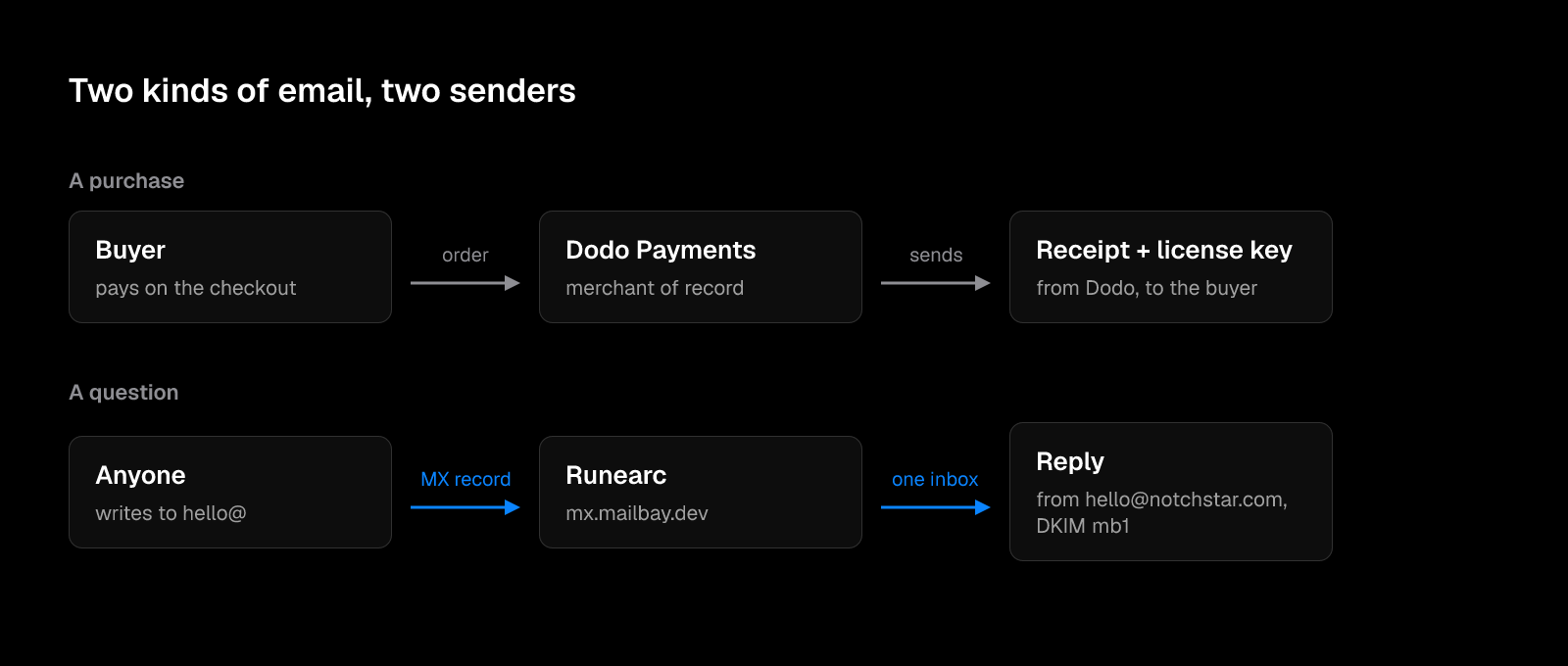
I keep them apart on purpose. The two have different failure modes, and I’d rather each one break on its own.
| Purchase email | Human email | |
|---|---|---|
| Triggered by | A payment | A person |
| Sent by | Dodo Payments | Me, from notchstar.com |
| From address | Dodo’s | hello@notchstar.com |
| What breaks if it fails | The buyer can’t activate | A question goes unanswered |
| What I maintain | Nothing | DNS records and the inbox |
Purchase email: let the merchant of record send it
NotchStar costs $4 once, for up to 3 Macs, with a 7 day free trial. Prices as of 7 October 2026. It’s sold through Dodo Payments, which is the merchant of record: Dodo is the seller on the receipt, handles tax, and creates the license key.
Because Dodo creates the key, Dodo also emails it. I don’t run any code that sends a purchase email. The only thing on my side is the page Dodo sends the buyer back to after paying. It’s a small Vercel function at site/api/thanks.js, and it shows the key if Dodo passes it in the address, or says it’s on its way if not:
// GET /thanks/  ->  the page Dodo returns buyers to. Shows the license key when Dodo passes it back.
const rawKey = q.get('license_key') || '';
const key = /^[A-Za-z0-9_-]{8,80}$/.test(rawKey) ? rawKey : '';
The page text is the honest version of both cases: “Your license key is on its way to your email from Dodo Payments” when there’s no key, and “It was also emailed to you” when there is. Under it there’s one line: “Any trouble? Write to hello@notchstar.com.” That line is the bridge between the two kinds of email.
Why not send my own receipt with a nicer template? Three reasons.
- The key already arrives. Writing my own email would mean a webhook, a second copy of the key, and a second place it can go wrong.
- The buyer’s payment details and email stay with Dodo, under Dodo’s privacy policy. The NotchStar privacy page says exactly that, and I’d like it to stay true.
- A receipt from the company that charged the card is what people expect. A second, prettier email from me adds nothing.
Human email: one domain, one inbox
Everything else goes to addresses on notchstar.com. The address you see everywhere is hello@notchstar.com. It’s in the site footer, on the privacy page, on the thank you page and in the launch posts.
I wanted three things from this setup:
- Every address on my own domain, so a reply looks like it comes from the product and not from a personal Gmail.
- One inbox for all of them, because one person reads all of them.
- Replies sent from the same address the person wrote to, signed so they don’t land in spam.
The mail for notchstar.com is handled by Runearc. I also build Runearc, so take this part as the setup I chose rather than a neutral review. Its mail server is mx.mailbay.dev (the product’s earlier name is still in the hostname). Mail to any notchstar.com address arrives there, lands in one shared inbox, and replies go out from the address it was sent to.
The usual alternative is a Google Workspace seat per product plus a separate sending service for anything automated. For one person with more than one product, that’s a mailbox, a bill and a set of DNS records per product, and none of them talk to each other.
The DNS records, exactly as they are
The notchstar.com domain uses Vercel DNS, the same place the website is hosted. Four kinds of record make the mail work. This is the real output, checked on 10 November 2026:
$ dig +noall +answer notchstar.com NS
notchstar.com.		86400	IN	NS	ns2.vercel-dns.com.
notchstar.com.		86400	IN	NS	ns1.vercel-dns.com.

$ dig +noall +answer notchstar.com MX
notchstar.com.		60	IN	MX	10 mx.mailbay.dev.

$ dig +noall +answer notchstar.com TXT
notchstar.com.		60	IN	TXT	"v=spf1 include:_spf.mailbay.dev ~all"
notchstar.com.		60	IN	TXT	"google-site-verification=9hpa4KOlbhcQFxLuMQTCNpOmTaeGIfr78DenzChdeho"

$ dig +noall +answer _dmarc.notchstar.com TXT
_dmarc.notchstar.com.	60	IN	TXT	"v=DMARC1; p=none; rua=mailto:dmarc@mailbay.dev"
And the signing key, shortened here because the full key is long:
$ dig +short mb1._domainkey.notchstar.com TXT
"v=DKIM1; k=rsa; p=MIIBIjANBgkqhkiG9w0BAQEFAAOCAQ8...
What each one does, in one line:
| Record | Value | What it does |
|---|---|---|
| MX | 10 mx.mailbay.dev | Tells other servers where to deliver mail for notchstar.com |
| SPF | v=spf1 include:_spf.mailbay.dev ~all | Lists which servers may send as notchstar.com |
| DKIM | mb1._domainkey | Public key that checks the signature on every reply |
| DMARC | p=none; rua=... | Says what to do when SPF and DKIM fail, and where to send reports |
The SPF include expands to a single address, which matches the mail server:
$ dig +short _spf.mailbay.dev TXT
"v=spf1 ip4:148.113.237.40 ~all"

$ dig +short mx.mailbay.dev A
148.113.237.40
Two things about these numbers are worth seeing. The TTLs on the mail records are 60 seconds, which is short. That’s useful while setting things up, because a wrong record is fixed within a minute, and it costs a few more lookups once things are stable. The nameservers have a TTL of 86400 (a day), which is normal.
The other is that the Google site verification record sits next to SPF in the same TXT set. That’s fine. Only one TXT record per name may start with v=spf1, and other TXT records don’t interfere with it.
What launch week did to the inbox
The site and the app point every question to hello@notchstar.com, so that’s where launch week went.
A launch puts your contact address in front of everyone who sells to new products: reviews, directory listings, ads, upvotes, design work. Most of those pitches open with a line about the launch and a congratulation, which makes them easy to sort.
The order that makes sense:
- Real questions first, the same day. A buyer who can’t activate is the one email that week that can turn into a refund or a bad review.
- Pitches in one batch, not through the day.
- A pitch that names something specific about the app and asks for one thing is worth reading. The rest can wait.
| What arrived | What I did with it |
|---|---|
| A buyer who can’t activate | Answer first, with the exact steps from the thank you page |
| A question about a feature | Answer, and note it if more than one person asks |
| A press or directory request | Answer when the listing is free and real |
| A generic pitch | Read in a batch, no reply needed |
What is still weak
Plainly, as of 10 November 2026:
- DMARC is
p=none. That means a receiving server is told to deliver mail that fails the checks anyway and only report it. It’s the right first step, but the point of DMARC is to move top=quarantineand thenp=rejectonce the reports show only real mail. - SPF ends in
~all(soft fail) rather than-all. Same story: fine while starting, stricter is better once you know every sender. - There’s no
MTA-STSpolicy (the standard that tells other servers to only deliver over an encrypted connection).dig _mta-sts.notchstar.com TXTreturns no record, so servers sending to notchstar.com aren’t told to require TLS. - Only one DKIM selector is published (
mb1). Rotating the key will need a second selector published before the switch. - The mail server’s hostname still carries the product’s old name. It works, but it’s one more thing to explain.
None of these stop mail from landing today. They’re the difference between “set up” and “locked down”.
Try it yourself
You can check your own domain in about a minute with dig, which ships with macOS. Replace example.com with your domain:
dig +noall +answer example.com MX
dig +noall +answer example.com TXT | grep -i spf
dig +noall +answer _dmarc.example.com TXT
dig +short _mta-sts.example.com TXT
For DKIM you need the selector, which your mail provider gives you. Common ones are google, selector1 and s1:
dig +short google._domainkey.example.com TXTHow to read the answers:
- No MX record means nobody can email you at that domain.
- More than one TXT record starting with
v=spf1is an error. Merge them into one. - No
_dmarcrecord means you get no reports and receivers make their own call. - An empty answer from
dig +shortisn’t proof a record is missing. Run it again without+shortand check that the status saysNOERRORand the answer section is empty.
If you’d rather not read dig output, Runearc has a free domain check that reads the same records and says what’s missing.
Cheat sheet
Before launch:
- Payment provider sends the receipt and the key. You only build the thank you page.
- The thank you page shows the key when it can, and a contact address either way.
- One contact address on your own domain, everywhere: site footer, privacy page, thank you page, app.
- MX, SPF, DKIM and DMARC published and checked with
dig. - Short TTLs (60 to 300 seconds) while you set up, so mistakes are cheap.
After launch:
- Real questions answered the same day.
- Pitches read in a batch.
- DMARC reports read, then
p=quarantine, thenp=reject. - SPF tightened to
-allonce every sender is listed. -
MTA-STSadded.
Close
If you want to try the app: notchstar.com. If you want the same setup for your own product’s email: runearc.com. Questions about either go to hello@notchstar.com.
NotchStar is a native Mac notch app, $4 once, with a 7 day free trial. Try it, or read the ten tools.